Restoring old family photos for Christmas: a gift timeline
How to turn worn family photographs into framed Christmas gifts: a November-to-December timeline, scanning and restoring steps, honest print sizes, and what it costs.
By the ColorizeOldPhotos editorial team
· 7 min read
Every December, searches for photo restoration climb, and the reason is not hard to guess: people are looking for gifts that mean something. A repaired, printed photograph is one of the least expensive meaningful gifts there is, and it is the rare present that gets kept instead of shelved. This guide is the timeline — what to do, in what order, starting now — and an honest account of what the tools can and cannot promise.
Why a restored photo works as a gift
Most gifts are bought. A restored photograph is made, and it is about the person receiving it rather than about the object. It suits the relative who has everything, the parent whose childhood photos live in one fading album, and anyone you will not see in person, because it posts flat in an envelope.
- It is one of a kind. Nobody else at the gift exchange is holding the recipient’s grandmother at twenty-five.
- It is cheap in money and rich in time. The cost is a scan, a few credits and a frame; the effort is exactly the kind that gets remembered.
- It gives back something lost. Damage reads as decay to the person who loves the photo. Handing them a clean, stable print hands back the picture they remember.
- It works at a distance. A 5×7 print in a rigid mailer survives the post better than most parcels and arrives already personal.
Work backwards from the print shop
Restoring takes minutes; printing is what has a queue. Many labs publish holiday ordering deadlines, and walk-in queues grow through the second week of December. Order by mid-December at the latest, earlier if you want a custom frame.
| When | Do this | Why |
|---|---|---|
| Early–mid November | Pick the photo, ask relatives for the story | The person who knows it can tell you which photo matters and what the card should say |
| Mid November | Scan the print | One evening with a flatbed, or a daylight phone photo if there is no scanner |
| Late November | Restore, colorize, compare the result | Ten minutes per photo; re-run anything you don’t like — previews are free |
| By mid December | Order prints and a frame; check your lab’s holiday deadline | Queues grow in the second week of December; custom framing takes longer |
Running late? A one-hour photo lab printing a 5×7 into a ready-made frame still makes the moment work. The gift is the picture; the presentation only has to be tidy.
Pick a photo the recipient will recognize
The photos that land hardest show the recipient’s people or places: a wedding, a young couple before the children, someone in uniform, the old house or shop, the car that was part of the family. Ask siblings or cousins which photo they would choose — they will also know the names and the story, which you need before you write anything on the card.
One caution: if the photo shows someone the recipient lost recently, a restored copy can be a comfort or a fresh grief, and you know which. The right photo is usually the one the recipient has mentioned, not the one you find most striking.
Scan it well — everything after depends on this
The restoration can only work with the pixels you give it. Our scanning guide has the details; the essentials: scan flat at 300 to 600 ppi (600 for small prints), in color mode even for black-and-white originals, with auto-enhance off. No scanner? Photograph the print in even daylight, camera parallel to the print, no flash.
Handle the print by its edges and keep the original afterward — the Library of Congress and the National Archives both advise keeping originals once digitized, and the archive advice on backups is the 3-2-1 rule: three copies, two kinds of media, one off-site.
Restore it, and decide about color
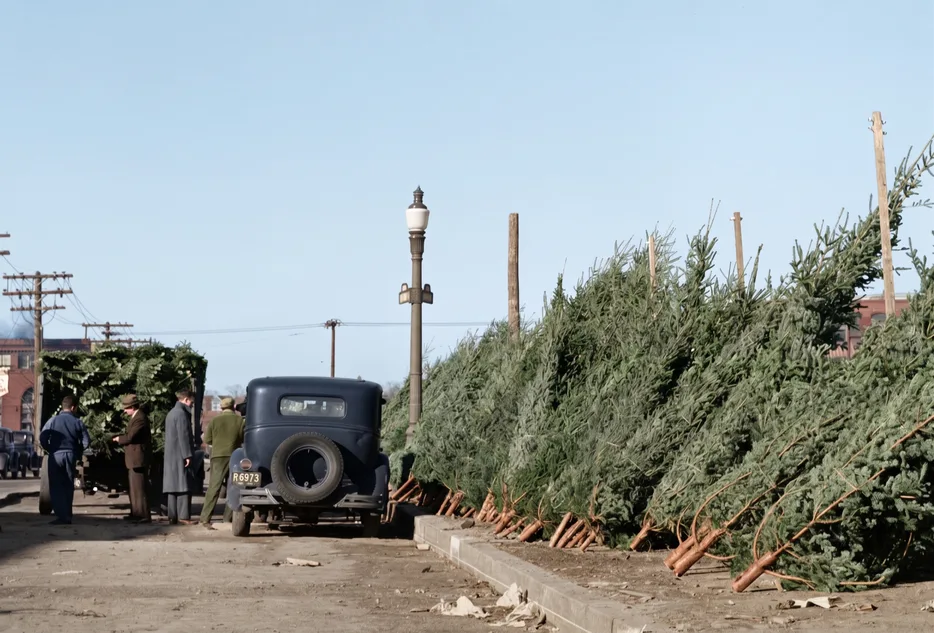
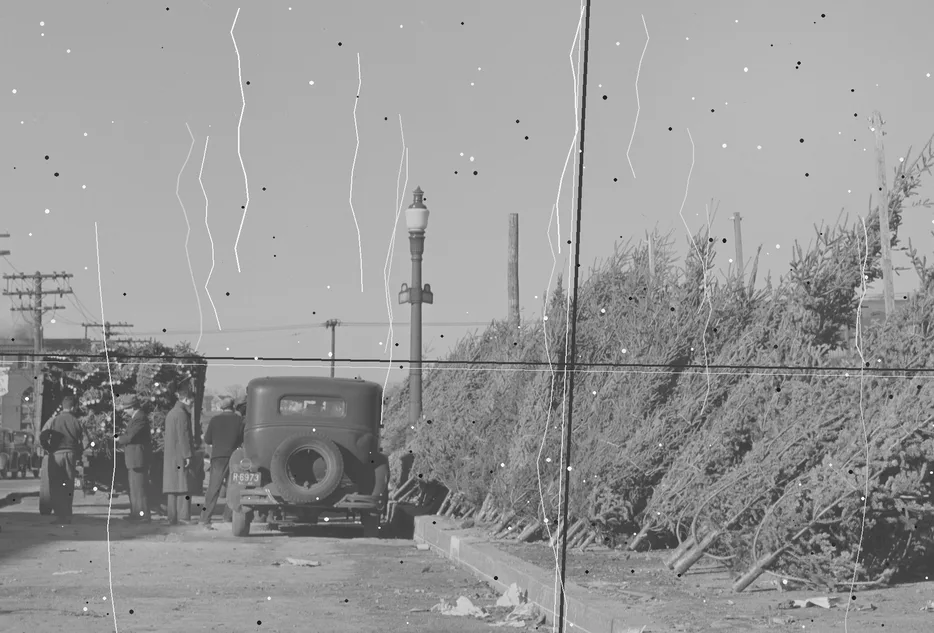
AI restoration is strong at the wear that accumulates over decades: scratches, creases, stains, fading and dust. In the example above, the creases, scratches and fading we added to a 1940 photograph of a Christmas-tree market in Providence, Rhode Island are gone, and the colorized result dresses the scene in plausible winter daylight. Every figure survives — but always compare the result with your original using the before/after slider, because a model that fills a scratch could in principle redraw an eyebrow. Missing pieces are different: they are reconstructed, not recovered, so treat anything the model had to invent as a guess. Our restoration tool shows a free watermarked preview before anything is charged, and the gallery has more before-and-after pairs.
Color is a separate decision. Colorization adds plausible color that no one can verify from a black-and-white original: skin, sky and brick usually read as right; a uniform or a dress may be invented. If the real color matters to the story, ask a relative who saw it before you print. Our article on how accurate AI colorization really is covers where to check.
Print, frame, write the card
- Size, honestly. Restored downloads are up to 2048 px on the long side — sharp at 5×7 in (13×18 cm) and still fine at 8×10 in. A colorize-only download keeps your scan’s full size, so a 600 ppi scan prints larger cleanly.
- Paper. Matte suits old photographs; gloss makes period prints look recent in the wrong way.
- Frame. A thin wood or brass frame in a standard size means you can buy it anywhere and replace it without a fuss.
- Card. Let the photo do the talking. Three lines that work: “Merry Christmas from 1962.” · “The house you grew up in, in color.” · “Same tree, sixty years on.”
What it costs
Previews are free and watermarked, with no sign-up, so you can test several photos before spending anything. Downloads use one-time credits — colorize 1 credit, restore or restore + colorize 2 — and packs start at $9.99 for 10 credits: enough for five restorations, or ten colorized downloads. Credits are valid for two years and there is no subscription. Full details are on the pricing page. Compared with most of December, that is the inexpensive part.
Sources
About this guide
Written by the ColorizeOldPhotos editorial team. ColorizeOldPhotos is operated by windflash, founded by Jason Guo, who since 2005 has started a number of projects spanning AI applications, website development, game development and operations. Read more on the about page.
Found a mistake or an out-of-date claim? Email support@colorizeoldphotos.com and we will fix it and note the change here.
Try it on your own photo
Upload a scan and see the result in about half a minute. Previews are free and need no sign-up.