How accurate is AI colorization? What it knows, what it guesses, and how to check
Why a black and white photo does not contain its own colors, which parts of an AI colorization you can trust, and where to find real color references from the same era.
By the ColorizeOldPhotos editorial team
· 7 min read
AI colorization can look convincing, and that is exactly the problem. A natural-looking result is not evidence that the colors are correct. This article explains why, shows an example from our own tool, and describes how to find out what colors were really there.
A black and white photo does not contain its colors
A monochrome photograph records how bright each part of a scene was, not what color it was. Many different colors have the same brightness, so the information needed to recover the original is simply not in the picture. Researchers call this an ill-posed problem. The DDColor paper, whose model powers our colorize-only mode, frames colorization as having many possible outputs and builds in a color-refinement stage to cope with that.
What a model does is use what it has learned from many color photographs to predict what is most likely: skies are blue, foliage is green, skin has a familiar range of tones. That prediction can be excellent for common things and arbitrary for everything else.
What tends to be reliable, and what is a guess
| Element | How much to trust it | Why |
|---|---|---|
| Skin and hair | Fairly reliable | Faces are the most common subject in training photos, and skin tones fall in a narrow range. |
| Sky, water, grass, trees, stone, wood | Mostly reliable | Natural materials have a limited range of plausible colors. |
| Clothing, uniforms, flags, vehicles | A guess | These can be almost any color, and period dyes and paints varied. |
| Signs, labels, packaging | A guess | Printed colors are design choices, not physics. |
| Small objects and background detail | A guess | Too little information for the model to infer. |
Same photograph, two answers
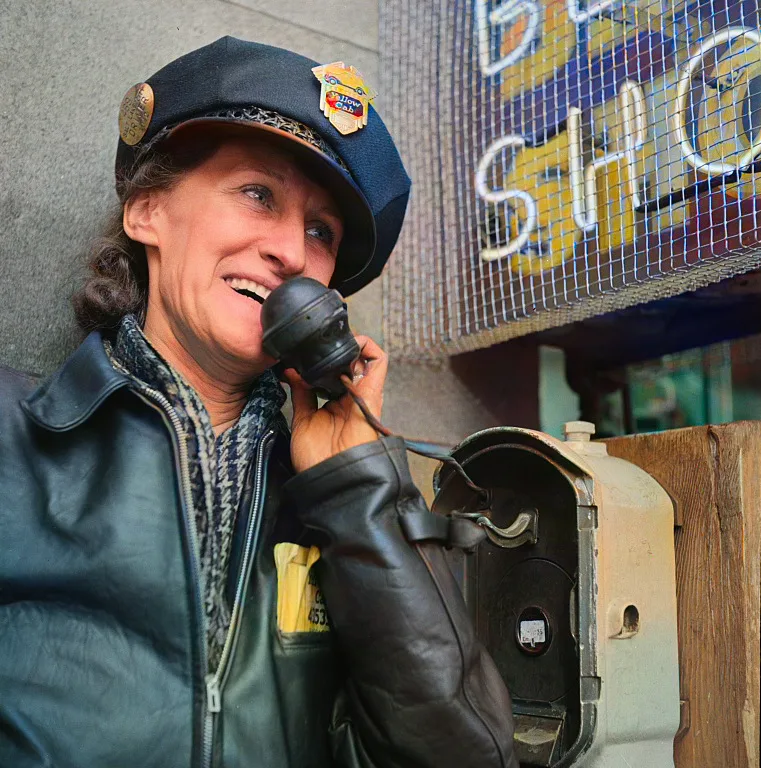
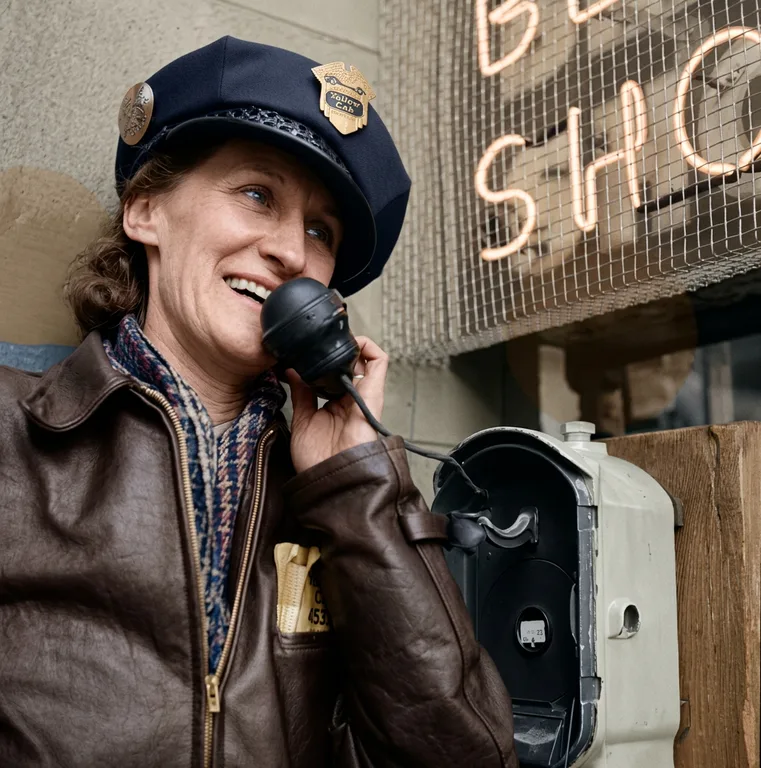
Both versions look natural. They cannot both be correct, and no one looking only at the black and white photograph could say which is closer. This is the clearest demonstration we know of why a plausible color is not a verified color.
How to find the real colors
- Ask the people who were there. A relative may remember the color of a dress, a car or a front door. Their memory beats a model.
- Look at real color photographs from the same time and place. Color photography existed earlier than most people expect. The Library of Congress holds about 1,600 color photographs made for the U.S. Farm Security Administration and Office of War Information between 1939 and 1944, most of them 35mm Kodachrome slides. They show everyday clothing, vehicles, buildings and interiors in real color.
- Check records for the specific thing. Museums, regimental associations and collectors document the colors of uniforms, insignia and vehicles for specific units and years.
- Look for physical objects. If the dress or the medal still exists, the real thing settles the question.
How to present a colorized photo honestly
- Say it is colorized. A caption such as “colorized with AI; colors are estimated” is enough.
- Keep the black and white original next to it, or at least keep the file.
- Do not use a colorized image as evidence of what something looked like. Use it as an illustration.
- If you verified a specific color, say what the source was.
For the practical steps of colorizing a photo, see how to colorize black and white photos.
Sources
About this guide
Written by the ColorizeOldPhotos editorial team. ColorizeOldPhotos is operated by windflash, founded by Jason Guo, who since 2005 has started a number of projects spanning AI applications, website development, game development and operations. Read more on the about page.
Found a mistake or an out-of-date claim? Email support@colorizeoldphotos.com and we will fix it and note the change here.
Try it on your own photo
Upload a scan and see the result in about half a minute. Previews are free and need no sign-up.