Old Photo Restoration
Repair scratches, creases, fading and blur while preserving each face as closely as possible. Optionally colorize in the same pass.
Drop an old photo here
JPG, PNG or WebP · up to 12 MB · no sign-up
Restoring takes about 30 seconds.
See the difference
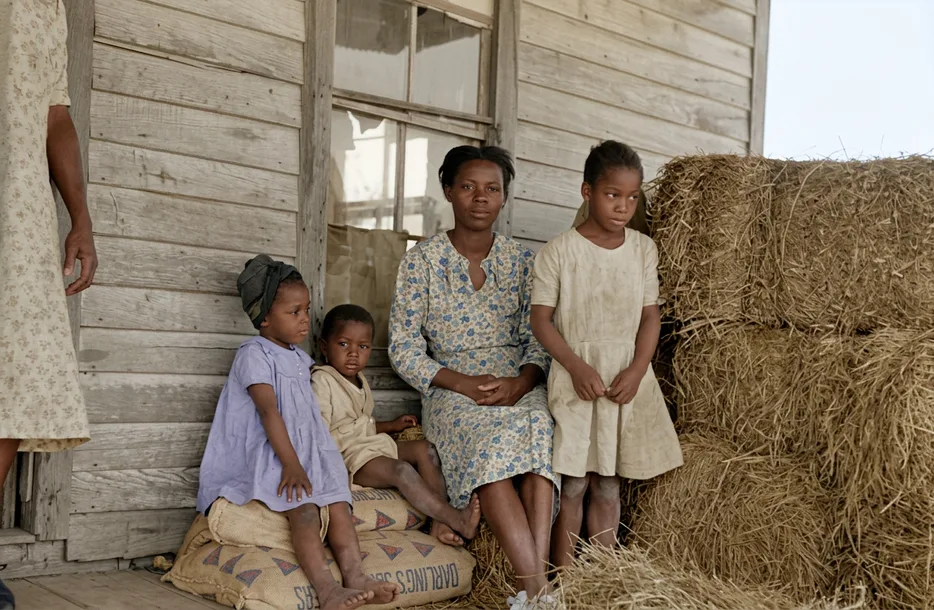
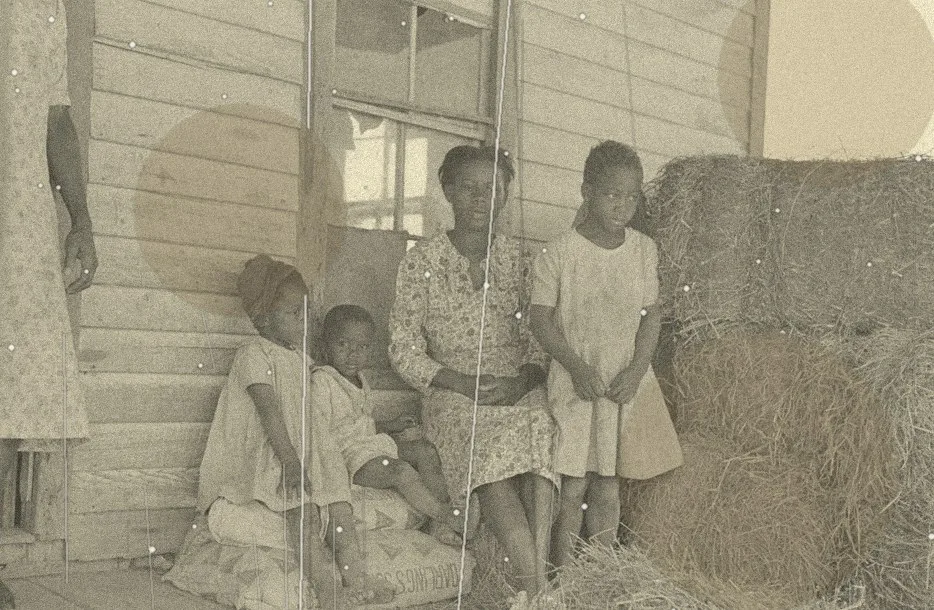
How to restore an old photo online
- Step 1
Scan or photograph the print
Use 600 DPI, or a flat, even, glare-free phone photo. Do not try to fix damage before scanning.
- Step 2
Choose restore, or restore and colorize
Restore keeps a black and white photo black and white. The color option repairs and colorizes together.
- Step 3
Check the faces
Use the slider to compare faces, then download. Try again if something looks changed.
What old photo restoration can fix
Prints wear in predictable ways, and most of it can be repaired digitally. Restoration works on the scan, so your original print is not touched.
Scratches and creases
Fine white lines, fold marks and cracks in the emulsion are removed and the underlying picture is rebuilt.
Stains and spots
Water marks, mold spots, glue and dust are cleaned up.
Fading and low contrast
Washed-out tones are recovered and contrast is restored.
Noise, grain and blur
Digital and film noise is reduced, and mild blur is sharpened without an over-processed look.
How AI restoration works, and why faces matter
Restoration uses a generative image editing model. Instead of only filtering pixels, it understands the scene and fills damaged areas with content that matches what is around them. This is what lets it remove a crease that runs across a face or a sky.
The same ability is a risk: a generative model can also redraw things it should have kept. We prompt the model to keep every face, expression, pose and item of clothing as it is, and not to add or remove people or objects. In our tests on a scratched historical portrait, this approach cleaned the damage and stayed closer to the original than face-restoration tools, which left scratches in place and smoothed skin.
It is still worth checking. Always compare the restored face with your original using the slider. If an expression looks different, run it again, or use a lower-damage version of the scan.
Restore only, or restore and colorize?
If you want to keep the historical look, choose restore only. The photo stays in black and white or sepia and simply looks like it did when it was new. If you want the picture to look alive to the family, choose restore and colorize. Doing both in one pass is better than colorizing first, because color applied to a crease or stain makes the damage more visible and harder to remove afterward.
Before you upload: getting a good scan
Most disappointing results start with a poor scan. Remove the print from its frame or album if you safely can, wipe dust with a soft dry brush, and scan flat at 600 DPI in color mode, even for black and white prints, because the extra channels help the tool see stains. If you must photograph the print, do it outdoors in shade or by a bright window, holding the camera directly above it to avoid perspective and glare.
Keep a copy of the raw scan. It is the master file, and any restoration, ours or anyone else's, is a version of it.
When to use a professional retoucher instead
An automatic tool is fast and inexpensive, and it handles most family prints well. Where large parts of a face are missing, where a print is torn into pieces, or where a photograph has legal, museum or commercial importance, a human retoucher working from the original is the better choice. AI reconstructs missing areas by inference, and inference is not recovery.
Related tools and guides
- Colorize old photos
Restore and colorize a photo in one step.
- AI photo colorizer
Colorize-only mode for clean black and white images.
- Pricing
Free previews; credits only when you download.
- Privacy policy
Photos deleted within 24 hours and never used for training.
Frequently asked questions
Are my photos stored or used to train AI?
No. Photos are processed to produce your result and are automatically deleted within one to two days. We never use uploads to train models.
Are the colors historically accurate?
AI colorization is an informed estimate, not a record of the original colors. Skin tones and natural scenes usually look right; uniforms, cars and clothing may need a manual tweak or a family recollection.
What kinds of damage can be repaired?
Scratches, creases, fading, stains, dust, noise and blur. Restoration uses generative AI, so faces are preserved as closely as possible but can change slightly; compare against your original. Very large missing areas are reconstructed rather than recovered.
What is the best way to scan an old print?
Scan at 600 DPI or photograph it flat in even daylight without flash. Higher-quality input gives noticeably better results.
Is it free?
You can preview results for free without signing up. Downloads use credits: colorizing costs 1 credit, restoring (with or without color) costs 2. New visitors get a few free previews every day.